
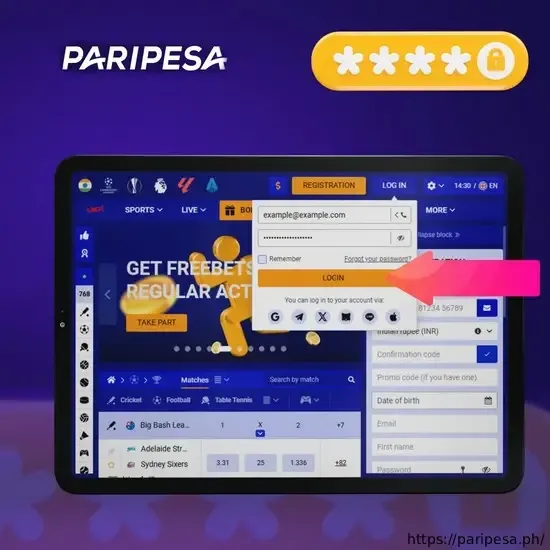
The Paripesa login from Kenya works like this: go to paripesa.co.ke (or open the app), press Log in at the top right, put in the phone number your account was opened with, making sure the code in front says +254, or switch the box to e-mail, then add the password and hit the orange button. When it fails, the usual suspects are the number format, the password itself, an SMS code that never shows up, or a block on the account. We take them one at a time below.
Paripesa login, one move at a time
- Type paripesa.co.ke into your browser, or tap the app you got from Paripesa’s own mobile page. Links shared in betting groups are how people end up on lookalike pages.
- Press Log in. On a laptop it’s beside the orange Registration button. On a phone it sits in the top bar.
- Check the little flag at the left of the number box. It should be Kenya, +254. Drop the leading zero from your number: 712 345 678 rather than 0712 345 678.
- If you joined with an e-mail address, tap the envelope symbol on the right of the number box to swap to e-mail.
- Put in the password and press Log in. Leave Remember unticked on any phone or computer other people use.
Password rejected? Check these first
When Paripesa insists the password is wrong and you’re certain it’s right, start with the dull causes. Phones capitalise the first letter for you. Browsers fill in a password you replaced long ago. Tap the eye at the right of the field to see exactly what went in.
If that doesn’t do it, use Forgot your password? below the box. A reset goes through the number or e-mail registered on the account, which means you need that SIM card or that inbox. Lost both? Then write to support from an address you can show is yours (our Paripesa contacts page lists them) and be ready to send ID.
SMS code not arriving
A texted code is how a phone registration gets confirmed, and you may meet one again when recovering access. Paripesa states the rules on the form itself: no more than 10 requests per 24 hours, and if 10 minutes pass with nothing, it tells you to contact support. So don’t waste requests. Before tapping again:
- read the number on the screen once more, +254 included;
- make sure the SIM is in the handset you’re holding and there’s signal;
- turn off any app that filters texts from unknown senders, including some antivirus apps;
- give it the whole 10 minutes. Hammering the button just eats your daily allowance.
On the sign-up form you also choose the delivery method from a drop-down below the number; it was set to SMS when we tried it.
Paripesa app login and mobile login
App, mobile site and desktop site all open the same account with the same phone or e-mail, password and balance. An app that forgets you each time you close it usually wants updating, and the update comes from the page you downloaded it from, as our Paripesa app guide explains. What people call “paripesa mobile login” is simply the normal site squeezed into a phone screen.
Account blocked, frozen or throwing an error
For locked accounts Paripesa keeps a dedicated address, block@paripesa.com. Send your message from the account’s e-mail and quote both the account number and the phone number. The terms list the usual triggers: a security review that needs documents, a second account (only one is allowed per person, family, address and IP) or a self-restriction you asked for. A self-restriction ends by itself once its period is over.
Logging in from Zambia, Nigeria, Tanzania or Ghana
Sign in where you signed up. Separate companies run the different country sites (paripesa.ng, for instance, prints a Nigerian operator in its footer), so a Kenyan account may not open on another country’s address, and vice versa. If paripesa.co.zm or paripesa.co.tz redirects you somewhere new, confirm it’s the site you registered on before typing any password.
Paripesa Partners login is a different system
“Paripesa partners login” and “paripesa affiliate login” refer to paripesapartners.com, the programme that pays website owners for referrals. Its accounts are separate. A betting password won’t open it, and an affiliate login can’t place bets.
Keep your login to yourself
There’s no legitimate reason for anyone at Paripesa to ask for your password or a code, so never hand them over. In a cyber café or on a borrowed laptop, skip Remember and sign out when you’re done. One more case: if the block is a self-exclusion you set during a rough patch, it’s working as intended, and our responsible gambling page has other support options in Kenya.